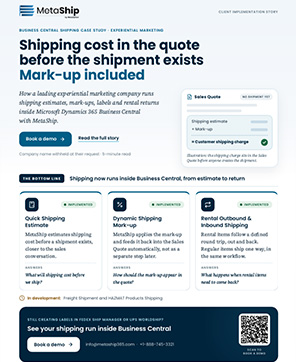
Auto Billing System to Automatically Add Shipping Costs to Every BC Order
Auto Billing feature in MetaShip fetches live carrier rates, applies your configured mark-up, and adds the shipping charges directly to sales quotes and orders- fully automated inside the Business Central.
Manual Freight Billing Creates Hidden Profit Leakage
MetaShip Auto Billing bridges the gap between all manually billed shipment that increases the risk of missed freight charges, inconsistent markups, and delayed reconciliation.
MetaShip automatically adds live carrier charges and configured markups directly to sales quotes and orders, ensuring shipping revenue is never missed.
Auto Billing in MetaShip calculates freight costs automatically using carrier rates, billing rules, and predefined markup percentages- no spreadsheet is needed.
Shipping charge lines flow automatically from quote to order to invoice- providing finance teams a complete overview of freight visibility without any need for post-shipment reconciliation.
MetaShip Auto Billing is designed to keep shipping charges, carrier billing, and freight updates fully connected inside Business Central with no external tools.
Three Steps, Fully Automated And
Connected In Business Central
MetaShip Auto Billing works directly inside your existing sales quote and shipping workflow- no separate billing system is required.
Generate live carrier rates
Apply markup & create charge
Convert to order & invoice
Auto Billing Solution Handles
Every Cost in BC
From carrier rate selection to invoice-ready freight charges, MetaShip automates every billing workflow inside Business Central- including outbound, inbound, markup and third-party billing scenarios — We are also available on Microsoft AppSource.
Compare carrier rates before adding the change
MetaShip displays carrier options side-by-side with service level, shipping cost, total amount and estimated delivery dates- allowing teams to select the best shipping option instantly.
- Compare UPS, FedEx, and multiple carriers in one screen
- Base rate, markup price, and total amount shown together
- Estimated delivery timeline displayed for every carrier option
Apply markup and create freight charges instantly
MetaShip automatically calculates carrier rates, applies configured markups, and generates shipping charge lines directly on the sales quote in one workflow.
- Shipping markup rules configured once inside BC
- Confirmation popup validates rate and markup before posting
- Charge line quantity, type, and amount added automatically
Shipping charge move from quote to order automatically
When sales quotes convert into orders, MetaShip automatically carries every freight charge and markup forward without any manual re-entry or reconciliation work.
- No manual freight re-entry during order conversion
- Shipping markup values are preserved automatically
- Freight charge lines stay visible throughout the order lifecycle
Manage outbound and return freight on the same quote
MetaShip supports separate inbound shipping estimates for rental returns and reverse logistics workflows directly inside the same Business Central
quote.
- Together adding inbound and outbound freight charges
- Each shipping direction routed with independent markup rules
- For billing clarity, comment lines are automatically added
Bill freight directly to customer carrier accounts
MetaShip routes shipments using customer carrier account details, allowing freight costs to bill directly to third-party accounts instead of internal shipping accounts.
- Enable third-party billing per shipment or order
- Store account number, billing type and postal details
- Mix standard and third-party billing across orders
What Happens Under The Hood, At Every Stage
For technical teams evaluating integration depth — here’s exactly how Auto Billing processes a charge from API call to posted invoice line.
Carrier API call & rate resolution
On rate request, MetaShip constructs a carrier API payload from the BC sales quote — shipment details, package dimensions, and origin/destination. The API response is parsed and returned as a comparison table within BC. No data leaves BC outside of the carrier API call.
Carrier API → Price ComparisonBilling logic & charge calculation
On row selection, MetaShip reads the configured mark-up from MetaShip Setup, applies it to the selected carrier base rate, and resolves the final charge amount. A confirmation pop-up surfaces the base rate, mark-up percentage, and calculated total before any line is written.
Mark-Up Engine → ConfirmationQuote conversion & automation flow
On OK, a G/L account charge line is written directly to the BC sales quote. When Make Order is triggered, BC’s standard quote-to-order conversion carries the line — no MetaShip logic runs again. The charge flows through pick, shipment, and invoice as a native BC order line.
BC Sales Line → Order → InvoiceWhy BC teams choose
MetaShip Auto Billing
We were manually calculating shipping mark-up on every single order. MetaShip Auto Billing eliminated that entirely — the charge line appears automatically, with the right mark-up, every time. We’ve recaptured margin we didn’t even know we were losing.
The rental workflow support was the deciding factor. We dispatch and collect, so we need both outbound and inbound charges on one quote. MetaShip handles that natively — no workarounds, just two charge lines on the same quote.
Trusted Carriers, Connected to Business Central





Frequently Asked Questions
Ready To Automate Every
Shipping Charge?
See MetaShip Auto Billing live inside your Business Central — real carrier rates, real mark-up, real charge lines on real orders.
No sandbox required · Works with your existing BC environment · Setup in under an hour