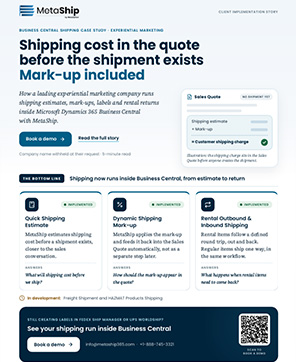
Inbound and Outbound Logistics On a Single Sales Quote
MetaShip simplifies inbound and outbound logistics by calculating outbound and return shipping charges on a single Business Central sales quote using live carrier rates, automated markups and zero manual re-entry.
Inbound and Outbound Logistics
Shouldn’t Be Managed Separately
When delivery and return shipping are handled and managed across different processes, tools or portals- your ERP creates the same four problems at every company.
Everything Your Inbound and Outbound Logistics Team Needs One Connected Workflow
Managing outbound deliveries, inbound returns, carrier shipments and logistics charges right inside the Business Central Workflow.
Outbound Shipping Estimates
Compare live carrier rates, apply markups automatically, and add outbound shipping charges directly to the Sales Quote.
Inbound Return Estimates
For rental and return workflows, MetaShip generates inbound return shipping estimates and add both logistics cost to the same Sales Quote automatically.
Multi-Package Logistics
Handle complex shipments accurately by creating multiple packages with unique dimensions and weights while calculating consolidated shipping costs across the entire shipment.
API & Manual Shipment Creation
Once packed, create an API shipments for carriers directly from Business Central or manually log the shipment with tracking number for order shipped outside the system and generate labels.
Automatic Charge Transfer
Inbound and outbound logistics shipping charges transfer automatically from Sales Quote to Sales Order with no-entry, reconciliation or missing freight costs.
Complete Inbound and Outbound Logistics Workflow in 6 Steps
Manage the delivery and return shipping costs from the inbound and outbound logistics workflow- from quote creation through order conversion and fulfillment planning.
Start with a Sales Quote in Business Central and add customer, items, and shipping details. For rental orders, return information is captured at the same stage including rental location Code, rental invoice Plan, and return location code.
- Add customer no. and external document no.
- Add item lines — sales items or rental items
- Set Shipping service and delivery contact information
- For rentals: define return date and location
Build the shipment by automatically creating or manually adding packages on the MetaShip Estimate screen. There you need to define package type, dimensions, quantity, and weight for each box for accurate carrier cost calculations.
- Select package type (BX1, BOX, etc.) and define quantity
- Dimensions are auto-populate based on package setup
- Enter actual package weight- each shipment in lbs
- Schedule shipment dates upto 10 days ahead.
Generate live delivery rates from the connected carriers and compare base price, delivery commitments, and total pricing side-by-side inside BC before sending the quote.
- Fetched live carrier rates from the supported carrier
- Compare pricing and transit times side-by-side
- Select preferred outbound services and click OK
- Automatically adding the outbound Shipping Charge
For all return orders, click Inbound Price Comparison in MetaShip. The same carrier rate comparison runs for the return leg, so that you can get the upfront cost of complete shipment before confirmation.
- Uses the same package configuration as outbound
- Return rates fetched and displayed side-by-side
- Select preferred inbound carrier and click OK
- Automatically added inbound shipping cost
Add delivery and return shipping charges to the Sales Quote automatically, including configured markups for each shipment direction- there is no manual entry required.
- Markup applied independently to each charge
- Outbound and inbound lines created automatically
- Add a comment line to label for clarity
- Total logistics cost visible on the Sales Quote before Approval
Finally click on Make Order- where the Sales Quote converted into an order with all logistics charges preserved and ready for shipment execution. Zero re-entry, full audit trail.
- All items transfer from Quote to Order
- Outbound and inbound charges transfer automatically
- Sales Order ready for warehouse shipment creation
- Complete audit trail is maintained in the system
Comprehensive Inbound and Outbound Logistics
We walk through your exact inbound and outbound logistics workflow — Sales Quotes, carrier comparison, both charge legs, and shipment creation.
What Changes When Inbound and Outbound Logistics
Lives Inside Your ERP
What Logistics Teams Are Saying
We ship hundreds of orders per month. Before MetaShip, getting an outbound logistics estimate meant leaving Business Central, checking UPS, checking FedEx, then manually entering the rate. Now it’s two clicks and done. The time savings are enormous. MetaShip is also available on Microsoft AppSource
The inbound return estimation changed everything for our rental business. We now give customers a complete logistics cost at quote time — outbound delivery and inbound return — instead of issuing a revised invoice three weeks later.
Having both inbound and outbound logistics charges auto-carry from the Sales Quote to the Sales Order has eliminated our biggest reconciliation headache. Our billing team actually has time to do their real work now.
Trusted Carriers, Connected to Business Central





Frequently Asked Questions
One Platform For Your Complete Inbound and Outbound Logistics
Book a demo and see MetaShip handle both delivery and return shipping inside Business Central — with your carrier accounts, your markups, your workflow.