

Well, shipping and receiving software is a tool that automatically connects and manages every step of inbound (what’s your receiving in warehouse) and outbound (what’s going out) logistics. When every step between your dock and your ERP is connected- your margins are protected and low risk of system breakdown.
Secondly, Quick Answer to “Why do you need shipping and receiving software in 2027?
Just think of it– A quantity gets entered wrong. A carrier rate gets checked in a separate portal. A shipment leaves before the invoice reflects the freight charge. Individually, these look like small process gaps but when you multiply them across hundreds of orders and receipts- they eat into margins, leading to inventory inaccuracy and impact on customer trust.
Here are the few stats and facts supporting the fact:
- The average warehouse loses $390,000 annually due to these kinds of errors- not from negligence, but from a process that was never built to bridge those gaps.
- Receiving and put-away account for 15-20% of total warehouse labour costs and manual processes are the primary driving this cost.
- Automating receiving workflows with shipping and receiving software can reduce inbound processing time by 40-55%.
That’s why the dock matters.
Quick Answer: What is Shipping and Receiving software?
Shipping and receiving software manages both the outbound dispatch and inbound receipt of goods—automating carrier rate comparison, label generation, barcode scanning, document creation, and ERP synchronization in one connected workflow.
Run Shipping and Receiving in One System
Stop switching between carrier portals and manual logs. MetaShip brings shipping and receiving — rate shopping, labels, tracking and inbound returns — into one connected flow inside Microsoft Dynamics 365 Business Central.
📅 Book a Free Demo →The best shipping and receiving software built to reduce manual data entry on both sides of the dock and keep inventory, shipment, and financial records accurate without re-entry.
It’s real job is not just to move boxes faster, but also keeping your shipping operations accurate while it moves them.
The Shipping Problems Most Businesses Don’t Realize They Have
Ask any warehouse manager how their shipping and receiving process works- they’ll probably describe something that sounds perfectly functional. Orders going out, goods coming in, labels get printed and receipts get logged.
But how many systems does it take to make it all that happen?- This won’t immediately tell you.
In reality- they might be using a carrier portal for UPS, another for FedEx. A spreadsheet for comparing rates. A separate label tool. A manual receiving log. And somewhere at the end, someone re-enters everything into the ERP and hopes it matches.
Using multiple tools and jumping between these tools to update shipping data- is actually stressful. The real cost isn’t just the error you catch- it’s the ones that leave the warehouse before anyone notices.
So where does the process break down?
On the Outbound Side:
- When carriers rates are checked manually- using one portal at a time.
- Labels printed from a separate system by manually re-entering the address.
- Shipping charges that never make it back to the sales order.
- Tracking numbers sitting in the carrier portals instead of ERP.
On the Inbound Side:
- Received quantities mostly logged on paper or in spreadsheets.
- No barcode verification against the purchase order or qualities.
- Inventory updates always run late.
- Discrepancies discovered at the month-end instead of at the clock.
These aren’t unusual problems. They’re the daily friction created when inbound and outbound shipping depend on disconnected tools.
What Should Shipping and Receiving Software Actually Do?
The right shipping software solution actually does more than just printing the label or record receipts. It should connect the inbound and outbound sides of your warehouse so information moves with the goods—not through spreadsheets, paper logs, and repeated data entry.
1. Automated Receiving
When goods arrive, your team should be able to receive them against the purchase order, scan items, verify quantities, and record discrepancies at the dock.
- Match receipts against purchase order
- Scan items, quantities, lots, or serial numbers
- Record shortages and discrepancies immediately
- Update inventory as goods are received
2. Simplify Picking, Packing, and Shipping
Once an order is ready to leave, the same workflow should take it from picking through shipment without switching systems.
- Create efficient pick and pack workflows
- Verify items and qualities with barcode scanning
- Compare live carrier rates from all connected carriers
- Select the right carrier and service level
- Print shipping labels and packing documents
3. Keep Tracking and Charges Connected
Shipping doesn’t end when the package leaves the dock. The shipment, tracking number, and freight cost should remain connected to the original order.
- Write tracking numbers back to the shipment
- Update customers with delivery information
- Post shipping charges to the order or invoice
- Keep shipment history available in the ERP
4. Giving Teams One Source Of Truth
The biggest perk of shipping and receiving software is not just automation. It’s having one accurate record of what came in, what went out, what is cost, and what remains in inventory.
How MetaShip Solves It Natively Inside Business Central
MetaShip connects inbound receiving and outbound shipping directly inside Microsoft Dynamics 365 Business Central. Instead of switching between carrier portals, spreadsheets, and separate shipping tools, your team can manage key warehouse workflows using the single system- while keeping shipping and inventory data connected to the ERP.
What Changes When Everything Is Connected?
| Disconnected Process | Connected Workflow with MetaShip |
|---|---|
| Re-enter receiving data | Receive goods against purchase orders |
| Check rates in carrier portals | Compare live carrier rates within the workflow |
| Print labels from another tool | Generate shipping labels from the shipment |
| Update tracking manually | Keep tracking details connected to shipment records |
| Reconcile freight later | Post shipping charges to the order and invoice |
One Connected Workflow—Fewer Performance Gaps!
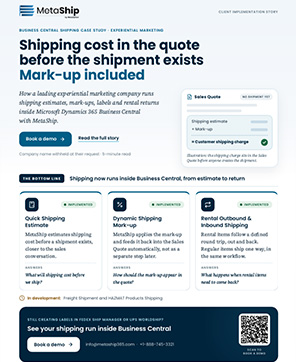
With MetaShip receiving, inventory, fulfillment, and shipping no longer need to operate as separate processes. Your team can verify incoming goods, process outgoing orders, compare carrier rates, print labels, and keep shipment details connected to Business Central records.
The result leads to less duplicate data entry, better shipment visibility, and greater control over inventory and freight costs—all within the ERP your business already uses.
Final Words: Connecting Every Step From Receiving to Shipping
Shipping and receiving shouldn’t be two disconnected processes. Moreover, not even managed by spreadsheets, manual entries and separate tools. When receiving, inventory, fulfillment and shipping work together—your team spends less time fixing errors and more time on moving boxes faster.
That’s where potential shipping and receiving software makes a big difference. It gives you complete control over what comes in, what goes out and what each shipment costs.
MetaShip brings these workflows directly into Microsoft Dynamics 365 Business Central – allowing your team to manage shipping, receiving and related data all through one connected system.
If your warehouse is ready to move beyond manual processes, then its time to connect both sides of the dock.
💡 Want to see this in action? MetaShip runs shipping and receiving inside Business Central—book a quick demo.
Frequently Asked Questions (FAQs)
Is shipping software different from shipping and receiving software?
Yes, shipping software majorly handles outbound dispatch, which includes carrier rates, labels, and tracking. Whereas shipping and receiving software automates and manage both directions- outbound and inbound logistics. The best platforms manage both sides in one connected workflow inside your ERP.
What does shipping and receiving software integrate with?
The best shipping and receiving software integrates natively with your ERP- not through a third-party connector or middleware. MetaShip is built as a native Dynamics 365 Business Central extension, so it shares your BC data, workflows, and user interface directly. No separate login, no sync required.
How does warehouse shipping software handle inbound receiving?
Warehouse shipping software with inbound capabilities lets your team pull up an open purchase order at the dock, scan arriving items against expected quantities, flag discrepancies in real time, and post received goods directly to inventory- all without leaving the ERP. MetaShip handles this natively inside Business Central.
Can shipping and receiving software reduce manual errors?
Yes, significantly. It majorly automates the shipping and receiving workflow by using the barcode scanning and ERP-native data flow that eliminates the need of re-key of data- where most errors originate.
Is MetaShip suitable for businesses with both inbound and outbound shipping volume?
MetaShip is built for exactly that scenario. It manages outbound carrier rate shopping, label generation, and shipment tracking alongside inbound PO receiving, barcode verification, and inventory posting- all inside Dynamics 365 Business Central. One system, both directions, zero middleware.
How long does it take to set up shipping and receiving software?
For MetaShip, setup is measured in hours, not weeks. Because it’s a native Business Central extension, it installs through the standard BC extension pipeline, inherits your existing security model and user roles, and requires no separate infrastructure. Most teams are live within a day.