

This might sound normal for one order—a few dollars extra that you can ignore once. But now do it 500 times a week!
That’s the real cost of shipping on autopilot, and it surely pinches you hard.
Quick Answer: What Is Rate Shopping Software?
Rate shopping software is built to automatically compare live shipping rates across multiple carriers (such as USPS, UPS, FedEx, and DHL) to select the most cost-effective option for every order. Apart from pulling carrier rates
Apart from fetching live rates, it applies your rules and shows the best option before you print the label. In an ERP-connected setup, it does this inside your order workflow, with no copy-pasting between carrier portals.
Find the Cheapest Carrier on Every Order
Stop guessing which carrier costs less. MetaShip is rate shopping software built inside Microsoft Dynamics 365 Business Central. Compare live UPS, FedEx, USPS and DHL rates on every shipment, apply rules by cost or delivery time, and add the shipping charge to the order automatically.
📅 Book a Free Demo →Why “Our Usual Carrier” Is Costing You Money?
Carrier prices never sit still. UPS and FedEx both set their 2026 general rate increases at a 5.9% average.
That’s the headline. Your bill tells a different story.
Residential fees, delivery area surcharges, and dimensional rules stack on top of base rates. So a standard home delivery can land well above the average increase before you’ve even added fuel.
Here’s the catch. How rate shopping software helps you ship cheaper and change the carrier charges:
- Package weight and size—one carrier wins at 2 lbs. Another wins at 18.
- Destination zone—rural and urban addresses price differently.
- Residential vs. commercial—surcharges vary by carrier.
- Service level—Ground, express, and economy don’t rank the same way twice.
No single carrier is cheapest on every shipment. That’s the whole case for multi-carrier rate shopping.
How Does Rate Shopping Software Work for Shipping?
It’s simpler than it sounds. Five steps, all automatic:
- Order data goes in. Weight, dimensions, ship-to address, and required delivery date.
- Rate requests go out. The software queries each connected carrier at the same time.
- Real-time shipping rates come back. They include the base rate, surcharges, and transit time for each service.
- Your rules filter the results. They can include delivery deadlines, carrier exclusions, and customer-specific terms.
- The best option is selected. You get the cheapest shipping rates that fit your constraints, label prints, and done.
In a nutshell, speed matters here. If a rate lookup takes minutes, your team will skip it. Good software returns results in seconds, at the pack station, while the box is still on the bench.
Read More: Multi-Carrier Shipping Software: Features, Benefits & How to Choose
Carrier Rate Comparison: Manual vs. Automated
Most teams started by manually checking multiple carrier websites and still end up with an expensive carrier deal. The reason being each site they checked one by one, and carrier rates keep fluctuating.
| Factor | Manual Comparison | Rate Shopping Software |
|---|---|---|
| Time per shipment | Consuming minutes of switching multiple tabs. | Comparing connected carriers simultaneously in seconds |
| Rates used | Often outdated or averaged | Always live and per-shipment |
| Surcharges | Easy to miss | Included in the quote |
| Consistency | Depends on who’s packing | Same rules every time, on every package |
| Scales at peak volume | No | Yes |
| Audit trail | Scattered notes | Logged against the order |
Manual comparison breaks first when you’re busiest. Peak season is exactly when it needed the most.
Compare Shipping Rates the Right Way: Look Beyond Price
Cheapest isn’t always best. A $1 saving means nothing if the parcel arrives two days late and triggers a refund.
Smart rate shopping software weighs more than the sticker price:
- Transit time—Match the service to the promise you made at checkout.
- Delivery cutoffs—Some carriers pick up later. That can save a same-day ship.
- Accessorial charges—Residential, delivery area, and additional handling fees change the final number.
- Dimensional weight—A big, light box can cost like a heavy one. Packing choices matter.
- Carrier reliability on the lane: Track delays and claims by route.
- Contracted rates—Your negotiated discounts should drive the comparison, not list prices.
Set your rules once. Let the system apply them every time.
7 Best Rate Shopping Software for 2027
The right tool depends on your stack, volume and team. Here are seven worth shortlisting.
| Software | Best For | Key Advantage |
| MetaShip | Microsoft Dynamics 365 Business Central users | Real-time carrier rates, auto packing and address validation, all inside your ERP |
| ShipStation | Growing multi-channel online stores | Compares USPS, UPS, FedEx, DHL and regional carriers from one screen, with strong automation |
| Shippo | Lean DTC teams and startups | Multi-carrier shipping with a clean dashboard, API access and predictable per-label costs |
| EasyPost | Engineering-led teams and platforms | One API covering 100+ carriers for rate shopping and label purchase |
| ShipperHQ | Ecommerce merchants focused on checkout | Controls shipping rates, methods and delivery dates at the checkout stage |
| ProShip | Enterprise and high-volume shippers | Rate selection driven by time-in-transit and delivery-date logic, built for complex carrier rules |
| Easyship | Stores with heavy cross-border volume | Many international couriers with pre-negotiated rates, plus customs and duties handling |
Pick on fit, not fame. Your ERP, your volume and your carrier contracts decide the winner.
Common Rate Shopping Software Mistakes
Even with software, shippers trip up. Watch for these:
- Comparing list rates instead of your contracted rates— The result looks right. It isn’t.
- Ignoring package data quality—Wrong weights or box sizes produce wrong quotes. Fix the inputs first.
- Forcing one carrier for “simplicity”—you save a click. You lose margin.
- Skipping the review—Check your shipping spend by carrier every month. Patterns show up fast.
- Running rate shopping outside your ERP—Every handoff between systems is a chance for an error.
How MetaShip Handles Rate Shopping Inside Business Central
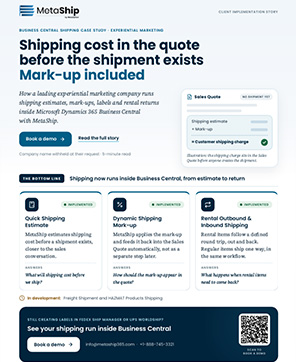
MetaShip is a packing and shipping solution built for Microsoft Dynamics 365 Business Central. It brings carrier rates, label printing, and tracking into the same screen where your orders already live.
What that means for your team:
- Real-time carrier rates inside your ERP. No separate carrier portals.
- Multi-carrier support. Compare options across carriers on every shipment.
- Auto packing. Smarter box selection helps cut wasted space and shipping cost.
- Address validation. Check addresses against carrier data to reduce delivery errors and returns.
- Customizable shipping rules. Set preferences that match how your business ships.
- Bulk label printing. Keep pace when volume spikes.
- Reporting and analytics. See shipping cost and performance trends in one place.
Your order data stays in Business Central. Your team stops re-keying it somewhere else.
Stop Guessing. Start Shipping Smarter.
Every parcel is a pricing decision. Right now, you’re probably making it by habit.
Rate shopping software turns that habit into a rule. Real-time quotes. Your constraints applied. The cheapest shipping rates that still deliver on time.
Ready to see it on your own orders? Talk to the MetaShip team and get a walkthrough built around your carriers and volumes.
Frequently Asked Questions (FAQ’s)
What does rate shopping software do?
It compares live prices from multiple carriers for each shipment and recommends the lowest-cost service that meets your delivery requirements.
Is the cheapest option always the best?
No. The best choice balances price, transit time and reliability. Good rate shopping software lets you set rules so cost savings never break a delivery promise.
How much can rate shopping software save?
It depends on your carrier mix, package profile and contracts. Savings come from choosing the right carrier per shipment, not from one flat discount. Run a sample of your own orders to see your number.
Do I need a multi-carrier setup?
If you ship across different weights, zones and service levels, yes. A single carrier is rarely the lowest price across all of them.
Can rate shopping software work inside an ERP?
Yes. Tools like MetaShip run inside Dynamics 365 Business Central, so rate lookup, labels and tracking happen in the same workflow as your orders.